When it's hard to tell an AI assistant what to change
An AI coding assistant can sketch a diagram in your terminal, but pointing out the one part you want changed can take a paragraph of its own. I made Relay so you can see the work in your browser and comment right on the part you mean.
In short
When an AI coding assistant draws a diagram in your terminal, pointing at the one part you want changed can take a whole paragraph. I made Relay, a browser board where you see the work and comment right on a chart value or a table cell, and where an unfinished review survives a reload or a long wait. Coding agents wrote much of the code; I directed, reviewed and tested it.

Picture a coding agent, an AI assistant that can read and change code, explaining the change it wants to make by drawing the architecture in your terminal out of dashes and pipes. For a small idea that works well enough, but as the diagram grows, reading it starts to feel like a second problem stacked on the first. If you want to comment on one connection, you first have to describe where that connection sits in a block of characters, and if the agent offers two layouts, you have to imagine each picture from a paragraph of text.
I kept running into this during terminal reviews after months of working with coding agents. Plenty of an agent's questions only need a typed answer, and the terminal is fine for those. The rest need a surface where you can see the work and point at the part you mean, and that was the gap I wanted to close.
When the agent has something to show you
So I made Relay, a board that runs locally in your browser, where an agent can lay out its work and collect your feedback in one place. The nearest everyday comparison is printing a draft and handing it to someone with a pen: they look at the whole page, circle what bothers them and write a note beside it, and you get the page back with each mark where it was made. Relay gives the exchange between you and an agent that kind of shared page.
Instead of printing a diagram into the terminal, the agent prepares a board that holds the material together with the questions it needs answered. The diagram can sit right beside the question it helps you answer, and two layout options can each carry their own image, so you compare pictures rather than descriptions of pictures. Related questions can share the same board, which means answering one does not leave you waiting for the agent to ask the next.
When you want to comment on one part
In the terminal, commenting on one connection meant describing its location first. On a board, the comment attaches to the work itself: you can point at a value in a chart or a cell in a table, or select a sentence in a document, and Relay returns your comment with information identifying what you pointed at. The agent then starts its revision from that target instead of from an instruction to change the part somewhere near the top.
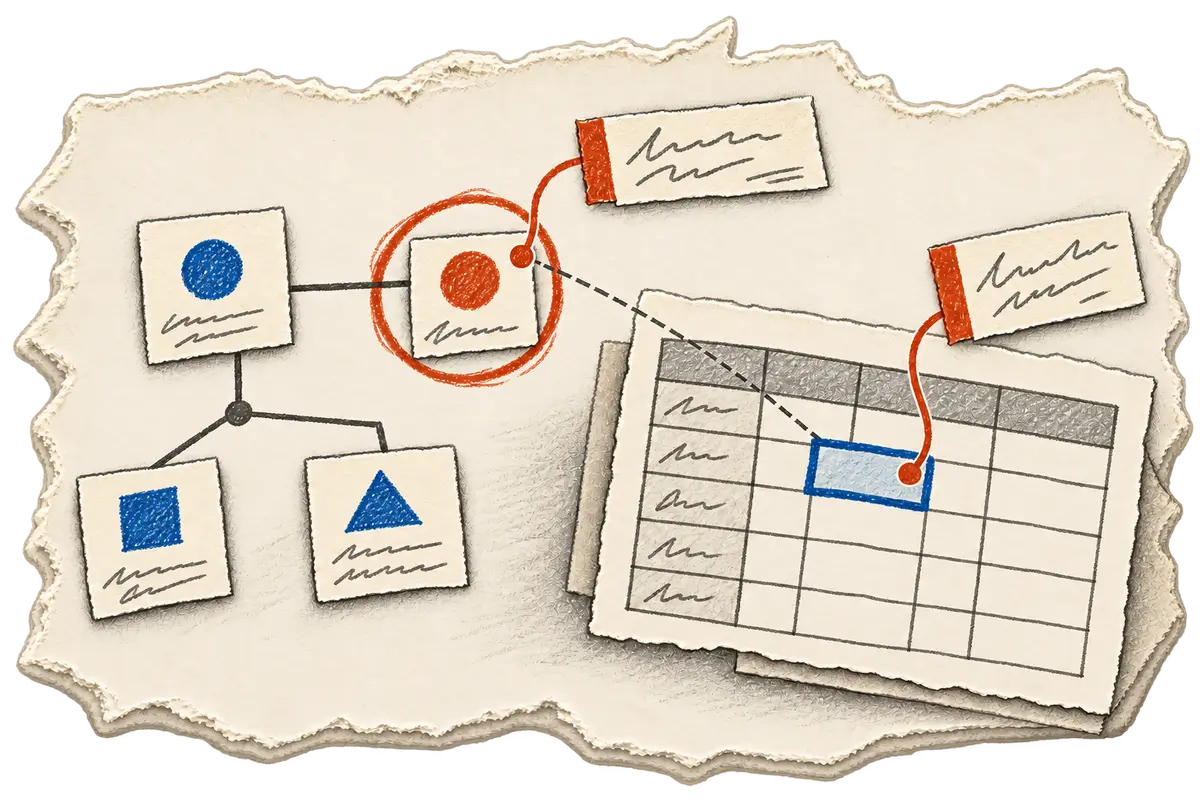
Comments are the feature I use most, because a preference usually comes with a qualification. I might pick one layout and still want its price to be clearer. Relay's operating instructions ask agents to read the answers and the accompanying notes together, so the choice and the note that adjusts it reach the agent as one piece of feedback.
There is also a small interaction detail I care about here, because looking at an option should not count as choosing it. Relay selects an option from its label row, so zooming into an image to check something, or leaving a comment on it, leaves your selection alone.
When the review gets interrupted
A careful review can take longer than an agent's tool call is allowed to wait, and the person answering can get pulled away halfway through. Detached mode covers the first case: it opens the board and returns the board's identity, so the agent can carry on and collect the result later. For the second, answers save automatically as you type them, reloading the page restores that input, and a timeout or a cancellation still leaves the draft in place.

That gives the agent a way back into the same review, as long as it does its part: check for an existing board before starting another one, and treat a draft as feedback that is not finished yet.
How Relay was made
I defined Relay's requirements and review workflow, directed the agent-assisted implementation, reviewed the changes and tested the result, including whether what comes back still holds the person's answers together with their notes. Coding agents produced much of the code. The section below covers installation and the commands an agent uses to open a board.
Install Relay and open a board
Relay is MIT licensed. It began as quest-board; the package is now @khanglvm/relay, with rly as its command. The documented runtime is Node 18 or newer.
npm i -g @khanglvm/relay
npx -y skills add khanglvm/relay -g -y
Given a board specification in board.json, this command opens the review and waits for submission:
rly ask --file board.json --timeout 1800
For a review that should stay available while the agent continues:
rly ask --file board.json --detach
rly wait b-xxxxx --timeout 3500
rly result b-xxxxx
Replace b-xxxxx with the returned board ID. The final command is a nonblocking look at the result, including the live draft. Board options can contain their own images:
{
  "id": "layout",
  "type": "single",
  "label": "Hero layout?",
  "options": [
    { "value": "split", "label": "Split", "blocks": [{ "type": "image", "src": "split.png", "height": 160 }] },
    { "value": "stack", "label": "Stacked", "blocks": [{ "type": "image", "src": "stack.png", "height": 160 }] }
  ]
}
Results are JSON on stdout and logs go to stderr. Exit codes distinguish submission (0), timeout (2), cancellation (3), usage error (4) and a missing board (5). Skipped questions appear in skipped and are absent from answers.
Relay has no runtime dependencies in node_modules. Chart.js, Mermaid and Graphviz WASM are vendored and loaded when needed, so their board rendering can work offline. The repository contains the specification and agent guidance.
A board earns its place when seeing the work makes the answer easier to give, and questions that only need a typed reply can stay in the terminal. If you want to try it, I would start with one visual decision, leave one specific comment, and check that the agent's next revision follows both the choice and the qualification in that comment.